My Moon Phase Pro
JRustonApps B.V.Weather
4.8222.00 Reviews
- Version
- 26.5.1
- Installs
- 10.00K
- Age Rating
- Everyone
Screenshots
Our Review of My Moon Phase Pro
 Analysis by Appyee
I’d treat My Moon Phase Pro as a focused companion for understanding the Moon’s schedule, rather than a complete guide to everything in the sky. That distinction makes it easier to know what a first-time user can reasonably expect: a place to check lunar timing and follow the cycle, not a replacement for a broad weather service or a full astronomy reference. For me, its appeal is the simple habit it supports—checking whether tonight is worth stepping outside, or choosing a date when the Moon will suit a photograph or a planned observation.
Getting oriented before you plan a night
On a first visit, I’d start by looking at the current lunar information and then exploring a date I already have in mind. That turns the app from something I merely browse into a practical planning tool. If I’m hoping to photograph a bright, clearly defined Moon, I can look ahead at its phase; if I want a darker sky for other stargazing, I can use the lunar calendar to avoid choosing a night dominated by moonlight. The important point is that a phase is a planning clue, not a promise of a good view: local clouds and the conditions around your chosen spot still matter.
It’s also worth deciding early whether you mainly care about your current location or expect to compare places. A location-based lunar schedule is useful for ordinary evening plans, while checking another location can help when travel is coming up or when you’re coordinating a shoot away from home. I’d make that choice before building a routine around particular times, since moonrise and moonset are tied to where you are. This is a small but useful habit: confirm the location you’re viewing before treating a displayed time as relevant to your plans.
A first useful check, not just a tour of screens
For a quick first success, I’d pick a real evening in the next few days, check the Moon’s phase and timing, and then compare that with the sky outside or the local forecast you normally use. This gives you a feel for what the information means in practice without needing to understand every lunar term. If the Moon is not visible when you expect it, that does not automatically mean the app is wrong; the time, your location, the horizon, and cloud cover all affect what you can actually see. The app helps with the lunar part of the decision, while your surroundings complete the picture.
That distinction matters when deciding whether to rely on the app alone. My Moon Phase Pro is aimed at lunar planning, so I’d use a dedicated local forecast when rain, wind, temperature, or broader outdoor safety is the main concern. For a Moon-focused outing, I’d check the lunar schedule here and use a weather source for the rest. Combining those checks is more dependable than assuming one specialized app can answer every question about a night outdoors.
Who will get the most from it
I think it makes the most sense for people who have a reason to notice the Moon: casual sky watchers, photographers who plan around lunar light, and anyone who enjoys following full and new moons. It can also suit a beginner who wants a straightforward way to connect dates with the lunar cycle. You do not need to be an astronomer to get value from checking when the Moon will rise or how its appearance changes over time.
On the other hand, I would skip it if what you really want is an all-purpose forecast, detailed guidance for identifying planets and constellations, or a tool that plans an entire observing session for you. A general weather app is the more direct choice for day-to-day conditions, and a broader skywatching app is a better fit when your main question is what else is overhead. My Moon Phase Pro is most useful when the Moon itself is the reason you opened your phone.
Exploring the Night Sky with My Moon Phase Pro
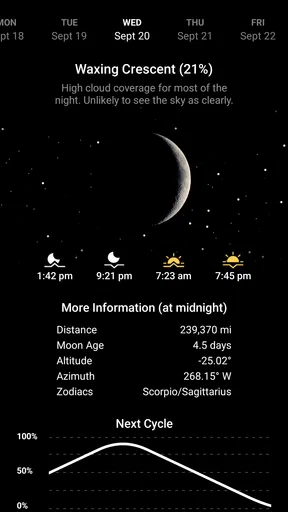
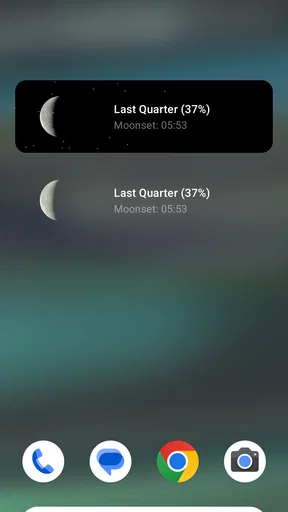
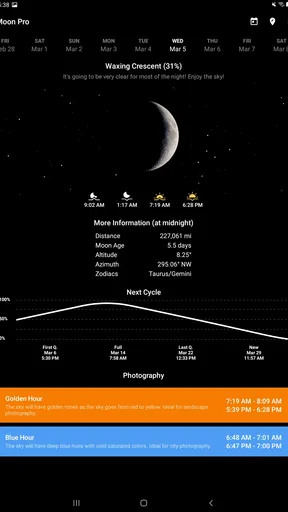
When I first opened My Moon Phase Pro, I was greeted with a sleek and user-friendly interface. The app is visually appealing, with a dark theme that feels appropriate for stargazing. The main screen provides a comprehensive overview of the current moon phase, complete with a percentage of illumination and the exact time of moonrise and moonset. It's like having a personal lunar calendar in your pocket!
Features That Shine
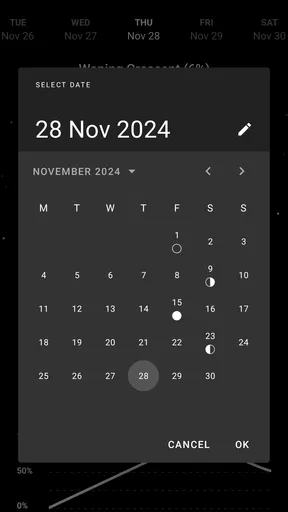
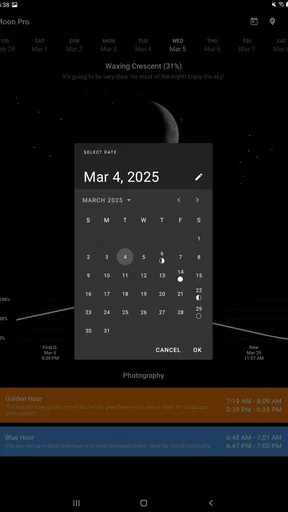
What really sets this app apart is its range of features. You can view detailed information about the moon's phases for any date, which is perfect if you're planning a future stargazing session or a night-time photography shoot. I found the notifications particularly handy—they remind you of upcoming full moons, new moons, and even lunar eclipses. No more missing out on these celestial events!
Another feature that caught my eye was the integration with weather data. The app provides cloud cover forecasts, so you can plan your moon-watching sessions on clear nights. Trust me, there's nothing more frustrating than gearing up for a night under the stars only to be thwarted by unexpected clouds.
Customization for Every Stargazer
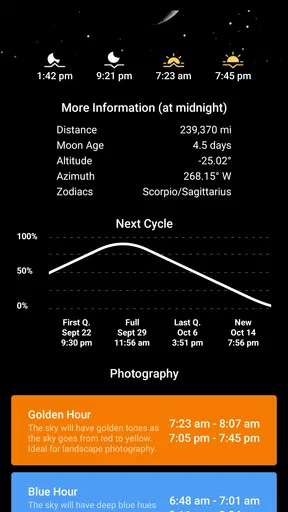
One of the aspects I appreciate most about My Moon Phase Pro is its customization options. You can choose to display information in a variety of formats, including a traditional calendar view or a list format. For those who like to immerse themselves in data, there's an option to view detailed statistics on moonrise, moonset, and the golden hour, which is particularly useful for photographers.
The app also supports multiple locations, so whether you're traveling or just curious about how the moon looks from another part of the world, you can easily switch between locations. This feature is a fun way to explore different perspectives of the moon.
User Experience: Smooth and Intuitive
As someone who's tested a fair share of apps, I've found that user experience can make or break an app. Fortunately, My Moon Phase Pro excels in this area. Navigating through the app is intuitive, with smooth transitions and a logical layout. Even if you're not tech-savvy, you'll find it easy to access all the app's features without feeling overwhelmed.
The app runs smoothly on both Android and iOS, and I didn't experience any crashes or bugs during my time using it. It's clear that the developers have put a lot of effort into ensuring a seamless user experience.
Putting the timing into practice
Here’s how I’d use those details for a realistic evening: suppose I’m free after dinner and want to take a few Moon photos from a nearby open area. I’d check the chosen date and location first, note the rise and set timing, then use the phase information to decide whether I’m after a bright lunar disk or a thinner crescent. Before leaving, I’d check the cloud outlook and bring the right lens or simply plan to enjoy the view without turning the outing into a photo assignment. The app can help me choose when to go; it cannot guarantee that a building, hill, haze, or cloud won’t obstruct the view.
For photography, a useful trade-off is that a bright Moon is easy to find and makes a clear subject, but it also adds light to the sky and can wash out faint stars. A less illuminated Moon may be better if the goal is a darker background, even though the lunar subject itself will be subtler. I wouldn’t treat “full moon” as automatically the best date. I’d choose according to the image I want, then use the app’s timing details to make the plan workable.
Making the calendar work for you
The calendar and list views serve different habits. I’d use the calendar when I’m comparing several dates or trying to fit an outing around work and family plans; a list is easier when I want to scan upcoming lunar events in sequence. Rather than checking the app every night, I’d pick a regular moment—perhaps while planning the week—to look ahead and decide whether any date is worth saving. That keeps lunar planning useful without making it another stream of notifications to manage.
Notifications are most valuable when a particular event matters to you. If I’m interested in a full moon or an eclipse, a reminder can save me from relying on memory. If I only check the Moon casually, I’d be selective about reminders so they stay meaningful. A notification is a prompt to look, not a guarantee of clear skies or visibility from my exact viewing spot; I’d still check the local conditions before making a special trip.
Weather context and its limits
The cloud-cover information is relevant because clouds are often the immediate reason a Moon outing fails, but it should be read as one part of the decision. For a short walk near home, a cloud check may be enough to decide whether it is worth stepping outside. For a longer drive, a photography session, or an evening when conditions matter for comfort, I’d also consult a regular forecast. That’s not a weakness unique to this app; it’s simply the difference between a lunar-focused view and the broader picture needed to plan time outdoors.
I’d also keep expectations flexible when forecasts and the actual sky disagree. Conditions can vary across a route, and a forecast is not a view of the exact patch of sky above your chosen spot. If the evening is important, check again close to departure and have a nearby alternative in mind. That practical backup is more useful than assuming any app can remove uncertainty from outdoor observing.
What the price means in everyday use
My Moon Phase Pro is a paid weather app from JRustonApps B.V. Its price is $3.99, and in-app purchases are listed at $0.99 per item. I’d judge that cost by how often I actually use lunar timing, not by how many screens an app can show. Someone who plans moonlit walks, watches phase changes, or takes lunar photos may find a dedicated tool convenient; someone who only wonders about the Moon once in a while may be perfectly happy with a basic calendar or a weather app they already use.
The age rating is Everyone, so the subject matter is suitable for a broad audience. The app was released on Jun 19, 2016, and version 26.3.0 is the current version. It has a 4.8 average from around 2.4 thousand ratings, with 219 written reviews and over 10 thousand installs. Those figures suggest an established, well-liked niche app, but I would still decide based on whether its lunar focus matches my own routine. It runs on devices with operating system version 7.0 or later.
How it compares with other ways to check the sky
Compared with a general weather app, the appeal here is the attention given to lunar phases and timing rather than a broad menu of everyday forecast details. Compared with a printed calendar or a simple phase widget, a dedicated app can be more convenient when I want to inspect dates and locations in context. But if I need to identify constellations, plan around several celestial objects, or get a complete forecast before hiking, I’d choose a tool built for that job and keep this one for the Moon-specific check.
That focused role is also why I wouldn’t recommend installing it just because it has a dark interface or sounds astronomical. The deciding question is whether knowing the Moon’s phase, rise, and set times will change what you do. If it will help you pick a photo night, arrange a walk, or notice a lunar event you otherwise might miss, the focus is an advantage. If not, it may feel narrower than the weather or sky app you already have.
Final Thoughts: A Must-Have for Moon Enthusiasts
In conclusion, My Moon Phase Pro is a fantastic tool for anyone interested in the moon and its cycles. Its combination of aesthetic design, comprehensive features, and user-friendly interface makes it a standout app in its category. Whether you're planning a romantic moonlit evening or preparing for a photography session, this app provides all the information you need at your fingertips.
So why not give it a try? The next time you're curious about the moon or planning an evening under the stars, My Moon Phase Pro will be your trusty companion. It's time to look up and marvel at the beauty of the night sky with confidence and clarity.
Verdict
Strengths of My Moon Phase Pro
- Intuitive and user-friendly interface.
- Accurate moon phase predictions.
- Customizable notifications for events.
- Offline access to lunar data.
- Beautiful, minimalistic design.
Limitations of My Moon Phase Pro
- Limited features in free version.
- Occasional syncing issues.
- No widget for quick view.
- Ads in the free version can be intrusive.
- Lacks detailed tutorials for beginners.
Other Releases by JRustonApps B.V.
View All
My Moon Phase - Lunar Calendar
Weather4.8

My Tide Times - Tables & Chart
Weather4.8

My Hurricane Tracker & Alerts
Weather4.7

My Lightning Tracker Pro
Weather4.7
Similar Picks in This Category
View All
Weather - By Xiaomi
Xiaomi Inc.4.1

Weather & Radar Forecast
WetterOnline4.8

Weather
OneLouder Apps4.6

AccuWeather: Weather Radar
AccuWeather3.6

The Weather Channel - Radar
The Weather Channel4.6

1Weather Forecasts & Radar
OneLouder Apps4.3
Frequently Asked Questions
What features does My Moon Phase Pro offer?
My Moon Phase Pro provides a comprehensive set of features for lunar enthusiasts, including detailed moon phase calendars, sunrise and sunset times, and notifications for new and full moons. It also offers weather forecasts, customizable widgets, and no ads, making it a seamless experience for users who want to track lunar cycles.
Is My Moon Phase Pro available on both Android and iOS?
Yes, My Moon Phase Pro is available on both Android and iOS platforms. Users can download it from the Google Play Store or the Apple App Store, ensuring compatibility across a wide range of devices. This cross-platform availability makes it accessible for most smartphone users.
Does My Moon Phase Pro require an internet connection?
My Moon Phase Pro can function both online and offline. While an internet connection is needed to update weather forecasts and sync data, the app maintains basic functionality offline. Users can still access moon phase data and other essential features without needing constant connectivity.
How user-friendly is My Moon Phase Pro for beginners?
My Moon Phase Pro is designed with a user-friendly interface that caters to both beginners and experienced users. The app provides intuitive navigation, clear visuals, and straightforward instructions, making it easy for anyone interested in lunar cycles to quickly understand and utilize its features effectively.
Are there any additional costs after purchasing My Moon Phase Pro?
Once you purchase My Moon Phase Pro, there are no additional in-app purchases or subscription fees. The app is a one-time purchase, providing all its features without hidden costs. This makes it an attractive option for users who prefer straightforward pricing with no ongoing expenses.
